There are a number of free and easy to use programs to help lower your ink costs. We tested the most popular programs and are here to give you our printer software reviews.
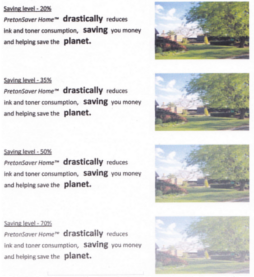
 PretonSaver Home Edition Review: This free printer software gives you the option to manually set how much ink the printer puts on the page. It intercepts the document before it goes to the printer and reduces the thickness of ink on the page by up to 70%. When we tested this using our Canon PIXMA MX870 there was no loss of quality at 20% and almost no change at 35%. Past 35% there was a noticeable loss in quality but the text was still very readable. Even at max saving mode (70%) the text was still completely legible.
PretonSaver also has a useful page counter and savings tally that can be viewed with every print. This gives you a detailed spending profile for your printer which is useful when considering your next printer or managing a budget.
PretonSaver Home Edition Review: This free printer software gives you the option to manually set how much ink the printer puts on the page. It intercepts the document before it goes to the printer and reduces the thickness of ink on the page by up to 70%. When we tested this using our Canon PIXMA MX870 there was no loss of quality at 20% and almost no change at 35%. Past 35% there was a noticeable loss in quality but the text was still very readable. Even at max saving mode (70%) the text was still completely legible.
PretonSaver also has a useful page counter and savings tally that can be viewed with every print. This gives you a detailed spending profile for your printer which is useful when considering your next printer or managing a budget.
 GreenPrint Review: For an organizer and image preview, GreenPrint World Edition is a great free program that can eliminate a lot of wasted pages and needless printing from your day to day computer use. GreenPrint's preview screen allows you to selectively eliminate elements such as graphics, ads, and images from your prints as well remove some of those extra pages that get unnecessarily tagged on to many documents. GreenPrint is also very versatile. It works well printing a variety of documents such as Powerpoints, webpages and standard text files. GreenPrint integrates easily with other software such as Preton or Inkgard and it comes with a PDF writer to save important emails or web pages on your hard drive. This saves you the hassle and cost of printing every receipt or confirmation while allowing you to more easily organize your documents electronically. While the World Edition is free, it comes with a rather annoying advertisement system which gives you a pop up after every print. This makes the $19 Home Premium edition worth the low price but the free version is still very functional.
Inkgard Review: The Inkgard printer software has many of the same features of Preton but with one big drawback- it isn't free. For $10/per year, Inkgard functions exactly like Preton by intercepting the images on their way to the printer and allows you to manually adjust how much ink is put on the page. It also gives you a page counter and is adjustable by document type. While it has a nice interface, it is not worth the cost when compared to such a nice program as Preton.
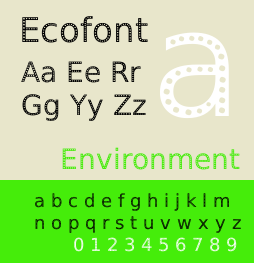
Ecofont Review: This set of fonts has been touted as an improvement on conventional fonts for saving ink. By adding holes throughout the letters of common fonts, Ecofont claims they can save you 50% on ink by eliminating much of the solid space in fonts. While it is a nice idea, our printer software review found that it has a number of drawbacks. It is uncommon and must be installed on specific machines. It also can't be used for anything except small text since once you get past 12pt the holes become painfully obvious.
If you read our previous blog about recommended ink saving fonts, Ecofont went unmentioned not only because it is not free ($26.58 for a 3 year license), but also because it is not as efficient as a free and common font, Century Schoolbook. As they admit on their own website, Ecofont loses out to the Century family of fonts on ink saving while Century is also web-ready and scalable to an infinite size. So save yourself some money and go with Century Schoolbook and you will have an even better effect on your ink costs while being much more versatile.
PrintWhatYouLike.com Review: This website allows you to selectively print sections of web pages by removing unnecessary advertisements and images easily. It is free and simple to install, however it essentially functions like a web only version of GreenPrint so if you are looking for a one stop solution to eliminating excess printing, GreenPrint is a more all encompassing option. However, if you are looking to just take specific images out of a website than this is a very useful tool.
Best Toner Saving Printers of 2016
Best Ink Saving Printers of 2016
Recommended Ink Saving Fonts
What the Font?
10 Comments
 1.07.12
I would suggest also to add this printing software, it combines several methods
http://www.greencloudprinter.com
4.02.13
i'm using preton for few years now it works great for me
http://www.preton.com/pretonsaver_home.asp
7.25.13
looks like Preton is no longer free either. It was working fine until the trial finished
9.22.13
Hello friends if you really want download all new printing software so please click on this link reset epson . There are you will get lot of software.
9.22.13
nice collection bro
10.29.13
Hello,
In order to reset the Epson Ink Pad you need to download the reset program which sets your printer counter to zero and it again starts with beginning.
epson ink reset
Thank you.
1.11.15
There are some similar reviews of ink saving software and ideas on http://veg-buildlog.blogspot.com/2014/10/saving-ink-with-spranq-ecofont.html
4.14.18
I have purchased the life time license for PretonSaverHome product. Works acceptably well but have to reinstall about once every 7-10 days. NO response from Preton Support. Company located outside US so unable to make phone contact with them. Almost to point of writing of the s/w as a financial loss. VERY disappointed.
10.22.18
I really appreciate your website! I spent a whole day trying to fix my drivers for HP. When I saw your website, I got relief that I wasn’t the only one. Maybe HP Will take note of your website and do something about it https://www.hptechsupportnumbers.com/hp-customer-support/
April, 2016
Best Toner Saving Printers of 2016
Best Ink Saving Printers of 2016
June, 2015
Best Ink Saving Printers 2015
May, 2015
Customers Love Inkfarm
Customers Love Inkfarm
May, 2014
Aspiring Business Contest Winners
March, 2014
Win A Printer For Your Business Or Start-Up!
February, 2014
Best Ink Saving Printers 2014
January, 2014
New Year, New Beginning Contest Winners
3D Printing for 2014
December, 2013
Printing Nuances and How to Fix Them
"New Year, New Beginning" Photo Contest Guidelines
Printable Holiday Elf Decoration
November, 2013
Printable Thanksgiving Decoration
September, 2013
2013 DIGITAL INNOVATION SCHOLARSHIP WINNER
July, 2013
About the Lexmark 200xl compatible ink cartridges
Page yield ratings and coverage percentages explained
Black and Tri-color cartridge pre-installation guide
Multi-color cartridge pre-installation guide
Alien Earth Photo Contest Winner
May, 2013
"Alien Earth" photo contest entry guidelines
Digital Innovation Scholarship 2013
Best Toner-Saving Laser Printers - 2013
April, 2013
Epson ink cartridge pre-installation guide
March, 2013
Best Ink-Saving Printers 2013
October, 2012
Breathtaking Portraits Photo Contest Winners
September, 2012
How Planned Obsolescence Affects You
$100 Photo Contest
August, 2012
GeekGirlCon 2012 Review
Drupa 2012 highlights
July, 2012
2012 Consumer Printer Trends
Laser Printers vs. Inkjet Printers: Pros and Cons
Sizzling Summer Photo Contest Winners
June, 2012
Why is Printer Ink so Expensive?
Genuine vs. Remanufactured and Compatible Cartridges
Funniest Candids Photo Contest Winners
May, 2012
A Glossary of Popular Printer Terms
Crafty Fridays: Printer Ink Cartridge Stamps
How to Make a Shower Karaoke with your iPad!
Almost Human Photo Contest Winners
Upcycling Ink Cartridges
April, 2012
5 Tips on Saving Printer Ink
Top 4 Printers of 2012
Best Ink-Saving Printers - 2012
Free Ink Giveaway
Talking GeekGirlCon with Susie Rantz
Beat the Winter Blues Photo Contest Winners
March, 2012
Laser "Un-printer" Wipes Paper Clean
Owning a Hackerspace: An Interview with Matt Westervelt
Instaprint: The Polaroid of Today?
Why you Should Print your Tax Return
H&R Block Online: How to Print your Tax Return
TurboTax Online: How to Print your Tax Return
How to get Copies of Previous Tax Returns
Printing from the Cloud
iPhone Photo Contest Winners
January, 2012
Seasons Greetings Photo Winners
December, 2011
Saving Your Photos in the Digital Age
12 Great and Free Holiday Fonts
Urban Black and White Winners
October, 2011
Photography Contest #2- Awesome Autumn
Kodak Stock in Free-fall
September, 2011
Bright and Beautiful Colors Winners
Photo Contest Terms and Conditions
August, 2011
DPI and Image Size
Printing On Photo Paper
Google Cloud Print From Your Android Phone
Google Cloud Print From Your iPhone
Digital Camera Modes
Photo Paper Types
GIMP Tutorial: Introduction GIMP Tools
The Cost of Digital Cameras
Compatible FAQ
July, 2011
Image File Extensions
Color Management Basics Page 3
Color Management Basics Page 4
Color Management Basics
Color Management Basics Page 2
Apple Loses in Kodak Patent Suit but Kodak Stock Falls
June, 2011
Printer Software for Saving Ink
Conservation and the Environment
Recommended Ink Saving Fonts
Best Printers for Saving Ink - 2011
May, 2011
Printer Ink - Toxic?
March, 2011
Holy Fonts, Batman!
What the Font?
Are Page Yield Ratings A Scam?
I couldn't find the free version of greenprint? Only a free 30 day trial. How do I get the free one?