For the light user: Kodak Office Hero 9.1 All-in-One
For the light printer user (<10 prints per week), the Kodak Office Hero 9.1 All-in-One Printer is a great choice. It not only prints, faxes and scans pages/photos/etc., but also works as a standalone copier and email sender. It is WiFi enabled and can be connected to your computer for faster speed via Ethernet connections. The Hero 9.1 also boasts a large 4.3” color LCD touchscreen to preview your photos and documents before printing.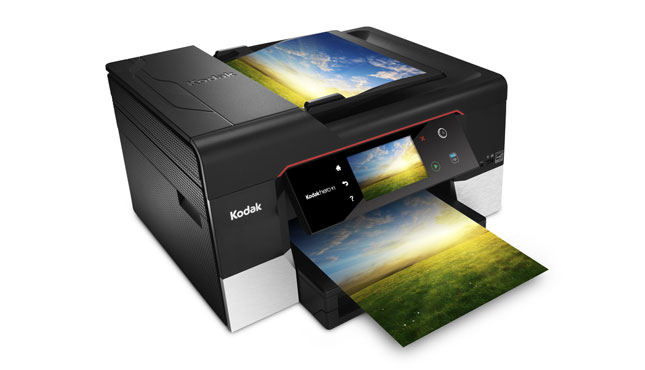 A 30-page automatic document feeder (ADF) attaches to the flatbed, which allows you to scan multi-page documents and legal size pages. It is limited to one-sided scanning, but does feature duplex printing (double-sided). The Office Hero 9.1 also comes with a 100-page paper tray, though smaller than its counterpart Office Hero 6.1., it still works great as a light-use printer.
Two unique features of this printer are its ability to capture and print video frames, as well as the ability to print an anaglyphic 3D color image (using 2 photos taken from about 3 inches apart). Two pairs of 3D glasses are even included with the printer at the time of purchase for you to view the 3D effect.
The Office Hero 9.1 has decent printing speeds for light home users, averaging 2.7 pages per minute for documents and 1 minute and 38 seconds for a 4x6 photo. Output quality is average for both text and graphics.
Overall, this home printer offers a lot of features and requires a relatively low claimed cost per page. Original Kodak ink cartridges costs $19.99 but 3rd party ink cartridges can be as low as $8.99.
For the typical user: Epson Workforce 845 All-in-One
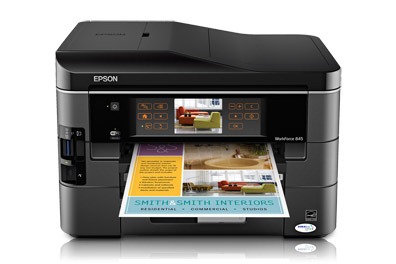 The Epson Workforce 845 All-in-One printer claims to be “the world’s fastest two-sided all-in-one” printer, delivering high-speed, automatic, two-sided printing, copying, scanning and faxing. It has built-in wired and wireless networking, and is Epson Connect enabled to be able to print from popular mobile devices.
 It has a 500-sheet paper capacity (250 sheets plain paper per 2 trays), allowing for easy multiple page print jobs. A 30-page automatic two-sided ADF boosts the paper-handling ability, making it a great medium-usage printer for the home or small office. The Workfocrce 845 is can also print quality photos.
High –capacity and extra high-capacity ink cartridges are available for the Workforce 845, boosting its page yield drastically. High capacity black and individual color cartridges yield about 385 and 470 pages, respectively; extra high-capacity black and individual color cartridges yield around 945 and 755 pages respectively. Original Epson cartridges can cost upwards of $29.99, but 3rd party ink cartridges for the Workforce 845 can be as low as $10.99.
Overall, this printer is a solid All-in-One printer with a superior paper capacity – great price for feature suitable to a small office or home.
For the heavy user: Epson Workforce Pro WP-4540 All-in-One
Although a bit larger and heavier than other inkjet multifunction printers, the Epson Workforce Pro WP-4540 definitely delivers in speed, paper handling and overall usage. Comparable to laser printers, the WP-4540 beasts similarly priced color lasers with faster speed and a lower running cost. This duplex printer can print, scan and fax.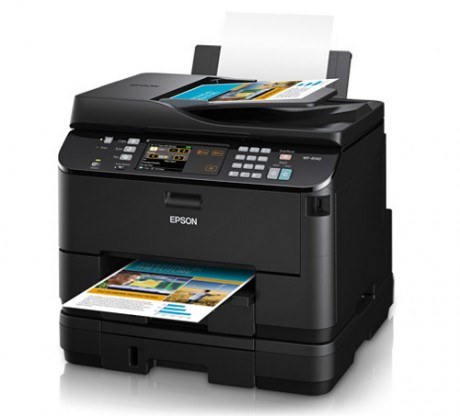 Apple AirPrint, Google Cloud Print and Epson Connect Email Print are all enabled and supported by this printer, making it extremely useful for mobile printing. It offers dual 250-sheet paper drawers and an 80-sheet tray for a total 580 sheet input capacity. The built-in duplexer helps to save on paper and ink, and allows for larger print jobs. A 30-page ADF is included to supplement the letter-size flatbed for scanning.
Though the printer is larger than most home models, the printing speeds may make up for that. In a PCmag.com test, the WP-4540 clocked in at 5.6 pages per minute, which is quicker than many color laser printers in the same price class. The high quality output for text and graphics also recommends this printer, especially for professional needs.
The claimed low cost per page is 1.6 cents for a B&W page and a 7.7 cents for a color page. Not only is this lower than most inkjets, but it’s lower than most laser printers at this price as well. Ink cartridges for the WP-4540 are a little more expensive (up to $38.49 for original Epson cartridges), but remanufactured and 3rd party cartridges can help you save money.
For photo printing Canon Pixma iP4920 Premium Inkjet Photo Printer
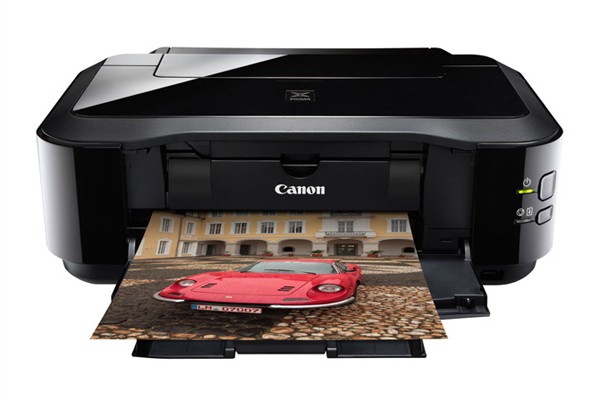 The Canon Pixma iP4920 is a pure single-function photo printer.. The small frame and light weight only adds to the home value, weighing in at only 12.3 pounds. Although it does not have any memory-card slots, the front-facing USB port allows you to print from a USB thumb drive or PictBridge-enabled camera, DV camcorder or camera phone. It has a generous 300-sheet total paper capacity with a built-in ADF.One downside is that it needs to be connected to a printer via USB. You can also print onto optical discs, CDs, DVDs or Blu-rays.
The new Full HD Movie Print software that comes with the printer allows you to turn HD movie clips into single prints, so you don’t have to be afraid of which mode you are shooting in. Printed photos can go from 4 x 6 up to 8.5 x 11, can be printed borderless and can be used with Auto Photo Fix II to correct things like overexposure. To make things even easier, you can easily print from the Internet via Easy-WebPrint EX.
The high performance, 5 individual ink tank system of the Pixma iP4920 consists of 4 dye-based inks plus a pigment-based black ink, which can be replaced individually so you only replace the one that runs out. Original Canon ink cartridges for this printer range from $13.99 to $15.99, but you can find 3rd party cartridges from as low as $7.91.
Best Toner Saving Printers of 2016
Best Ink Saving Printers of 2016
Recommended Ink Saving Fonts
What the Font?
0 Comments
April, 2016
Best Toner Saving Printers of 2016
Best Ink Saving Printers of 2016
June, 2015
Best Ink Saving Printers 2015
May, 2015
Customers Love Inkfarm
Customers Love Inkfarm
May, 2014
Aspiring Business Contest Winners
March, 2014
Win A Printer For Your Business Or Start-Up!
February, 2014
Best Ink Saving Printers 2014
January, 2014
New Year, New Beginning Contest Winners
3D Printing for 2014
December, 2013
Printing Nuances and How to Fix Them
"New Year, New Beginning" Photo Contest Guidelines
Printable Holiday Elf Decoration
November, 2013
Printable Thanksgiving Decoration
September, 2013
2013 DIGITAL INNOVATION SCHOLARSHIP WINNER
July, 2013
About the Lexmark 200xl compatible ink cartridges
Page yield ratings and coverage percentages explained
Black and Tri-color cartridge pre-installation guide
Multi-color cartridge pre-installation guide
Alien Earth Photo Contest Winner
May, 2013
"Alien Earth" photo contest entry guidelines
Digital Innovation Scholarship 2013
Best Toner-Saving Laser Printers - 2013
April, 2013
Epson ink cartridge pre-installation guide
March, 2013
Best Ink-Saving Printers 2013
October, 2012
Breathtaking Portraits Photo Contest Winners
September, 2012
How Planned Obsolescence Affects You
$100 Photo Contest
August, 2012
GeekGirlCon 2012 Review
Drupa 2012 highlights
July, 2012
2012 Consumer Printer Trends
Laser Printers vs. Inkjet Printers: Pros and Cons
Sizzling Summer Photo Contest Winners
June, 2012
Why is Printer Ink so Expensive?
Genuine vs. Remanufactured and Compatible Cartridges
Funniest Candids Photo Contest Winners
May, 2012
A Glossary of Popular Printer Terms
Crafty Fridays: Printer Ink Cartridge Stamps
How to Make a Shower Karaoke with your iPad!
Almost Human Photo Contest Winners
Upcycling Ink Cartridges
April, 2012
5 Tips on Saving Printer Ink
Top 4 Printers of 2012
Best Ink-Saving Printers - 2012
Free Ink Giveaway
Talking GeekGirlCon with Susie Rantz
Beat the Winter Blues Photo Contest Winners
March, 2012
Laser "Un-printer" Wipes Paper Clean
Owning a Hackerspace: An Interview with Matt Westervelt
Instaprint: The Polaroid of Today?
Why you Should Print your Tax Return
H&R Block Online: How to Print your Tax Return
TurboTax Online: How to Print your Tax Return
How to get Copies of Previous Tax Returns
Printing from the Cloud
iPhone Photo Contest Winners
January, 2012
Seasons Greetings Photo Winners
December, 2011
Saving Your Photos in the Digital Age
12 Great and Free Holiday Fonts
Urban Black and White Winners
October, 2011
Photography Contest #2- Awesome Autumn
Kodak Stock in Free-fall
September, 2011
Bright and Beautiful Colors Winners
Photo Contest Terms and Conditions
August, 2011
DPI and Image Size
Printing On Photo Paper
Google Cloud Print From Your Android Phone
Google Cloud Print From Your iPhone
Digital Camera Modes
Photo Paper Types
GIMP Tutorial: Introduction GIMP Tools
The Cost of Digital Cameras
Compatible FAQ
July, 2011
Image File Extensions
Color Management Basics Page 3
Color Management Basics Page 4
Color Management Basics
Color Management Basics Page 2
Apple Loses in Kodak Patent Suit but Kodak Stock Falls
June, 2011
Printer Software for Saving Ink
Conservation and the Environment
Recommended Ink Saving Fonts
Best Printers for Saving Ink - 2011
May, 2011
Printer Ink - Toxic?
March, 2011
Holy Fonts, Batman!
What the Font?
Are Page Yield Ratings A Scam?